Flight simulation videos have always been popular. Many people love watching pilots fly airplanes in realistic games. But these videos used to be very long — sometimes 1 hour, 2 hours, or even more! Now, things are changing. Flight sim creators are making short-form edits. These are short videos, usually between 15 seconds and 1 minute long.
Why? Because short videos are much easier for people to watch. Most people today like quick videos that show the best parts of a game or flight. If you add fun effects, voices, or funny moments, even better! Some creators are even using text to speech tools. These tools help you add a computer voice to your video easily. You just type what you want to say, and the tool speaks it for you! It saves time and makes videos more interesting without recording your own voice.
Short-form edits are not only easy to watch, but they also get more likes, comments, and shares. Platforms like TikTok, YouTube Shorts, and Instagram Reels promote short videos more. That means if you post short and fun flight sim videos, you can reach more people. And you don’t have to spend hours editing a long video!
Why Short-Form Videos Work So Well
Short videos fit perfectly into people’s busy lives. Many people scroll social media during small breaks — maybe while waiting for a bus, standing in line, or relaxing after school or work. Nobody wants to watch a full two-hour flight unless they are hardcore fans. But a 30-second clip of a funny landing or a near crash? That’s something everyone loves to watch!
Also, short videos can easily go viral. When a clip is funny, amazing, or surprising, people quickly like it and share it with friends. That’s why flight sim creators are focusing on short edits. They show only the most exciting or funny moments. These clips grab attention fast, which is super important online.
Adding cool effects like captions, funny voices, and sound effects can make your short videos even better. Many creators use tools like CapCut because it is free and very easy to use. CapCut also has amazing features like the AI video generator, which we’ll talk about next!
How AI Is Helping Flight Sim Creators
Editing videos used to take a lot of time. You had to watch the whole recording, pick the best parts, cut them, and add effects. Now, things are much faster! Many creators use AI tools to help with editing.
For example, the AI video generator from CapCut can help you create videos quickly. You can give it an idea, and it will help you build a video around it. Imagine you want a short clip of “the best landing moments.” Instead of searching your entire flight video, the AI can find the exciting parts for you.
Using AI tools also means you can make more videos in less time. And the more videos you post, the more chances you have to get followers, likes, and views. That’s why many flight sim creators are excited about AI. It helps them work faster and create better content without spending hours and hours editing.
Step-by-Step Guide: How to Add a Voice Changer in CapCut Desktop
Adding fun voices to your video can make it even more entertaining. CapCut has a simple voice changer tool that lets you do this. Here’s a very easy guide:
Step 1: Import Video
To add a voice changer effect in CapCut Desktop, first open the CapCut app on your computer and start a new project. Then, import your flight simulation video by clicking on “Import” and selecting the file you want to edit. Once your video is loaded, drag it onto the timeline at the bottom of the screen.

Step 2: Add Voice Changer
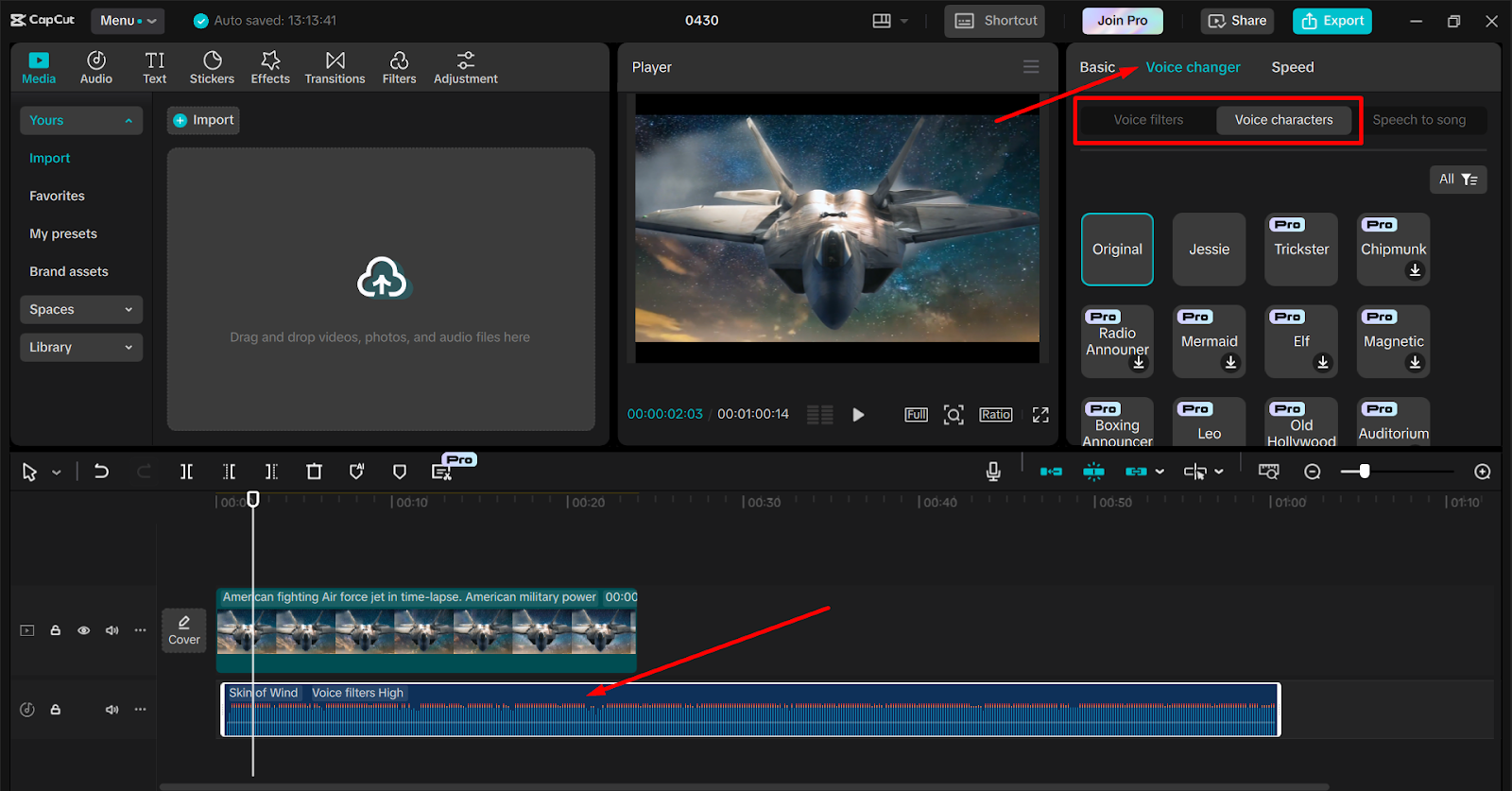
Click on your video clip to select it. Now, go to the right-side menu and find the option for “Voice Effects” or “Voice Changer.” Here you can see many different voice options like “Robot,” “Deep,” “Chipmunk,” and more. You can listen to each voice and choose the one that sounds best for your video. After you apply the voice changer, you can make small adjustments if needed to make it sound even better.
Step 3: Export Video
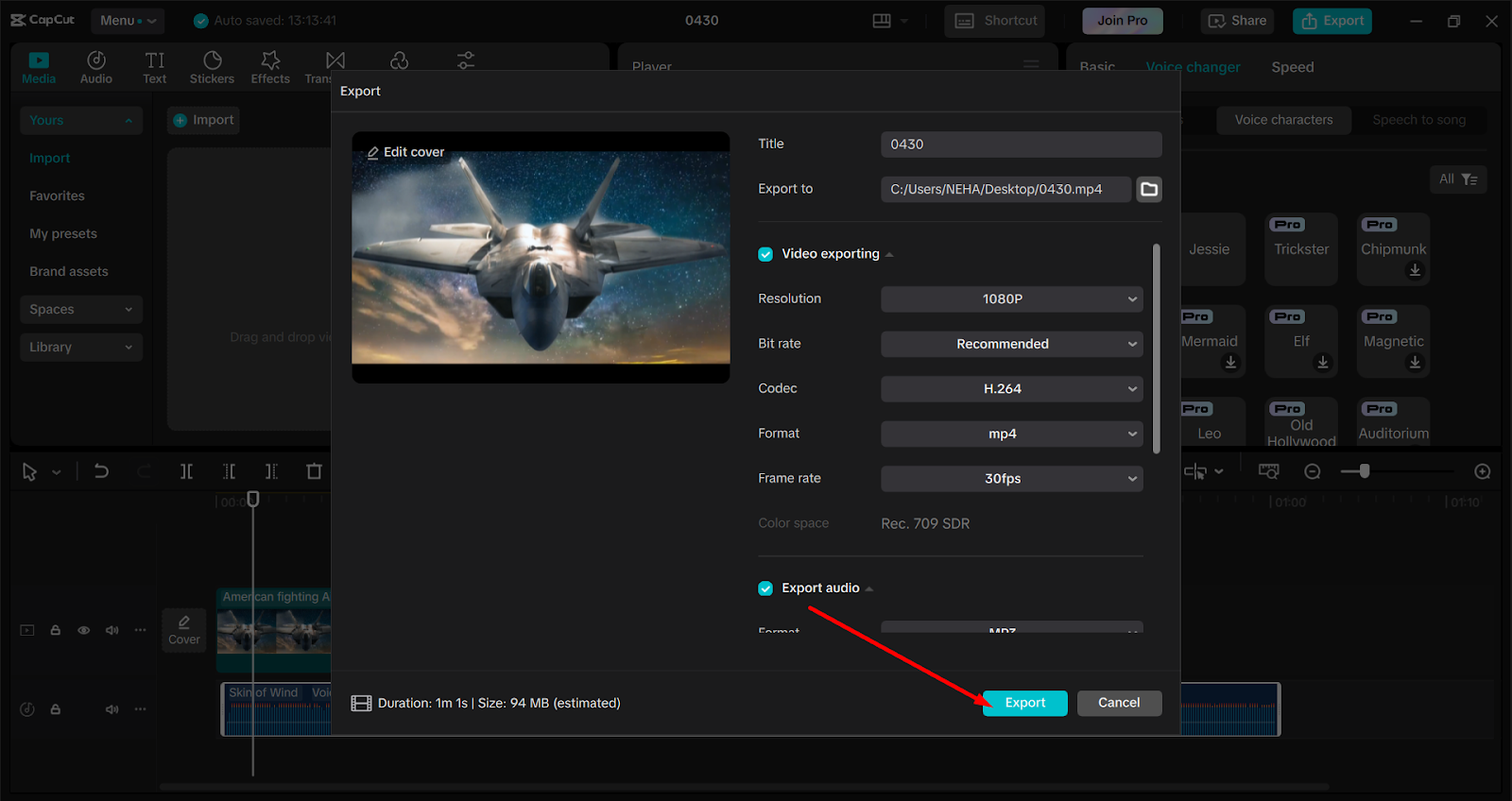
Once you are happy with everything, click on “Export” at the top right of the screen. Select your video quality settings and save the finished video to your computer. Now your short flight sim video has a fun new voice effect!
Why Adding a Voice Changer Makes Your Videos Better
Sometimes, a normal voice can sound boring, especially if your video is very short. Using a voice changer makes it fun! Imagine a serious flight scene but the pilot sounds like a robot. Or a landing video where the voice sounds like a chipmunk. This kind of surprise makes people laugh — and they are more likely to share the video with their friends.
A voice changer can also help if you are shy about recording your real voice. Maybe you don’t like how your voice sounds, or you want to create different characters. With CapCut, you can easily change your voice and still make amazing videos.
Also, funny voices keep people watching. On apps like TikTok, if your video is funny or different, viewers will watch till the end. This helps your video rank higher and get even more views!
Conclusion: Short-Form is the Future for Flight Sim Creators
Flight sim creators are smart enough to move toward short-form edits. Short videos are easier to watch, easier to make, and much better for getting noticed on social media. Using simple tools like CapCut’s text to speech, AI video generator, and voice changer makes the whole process even easier.
You don’t need to be a professional editor. You don’t need expensive software. With CapCut and a little creativity, you can create short, fun, and powerful flight sim videos that everyone will love.
So next time you finish a flight sim session, don’t think about editing a 2-hour video. Instead, pick one amazing moment, add a funny voice or a smart caption, and post it! Short-form is the way to grow fast and make your flight sim content shine.